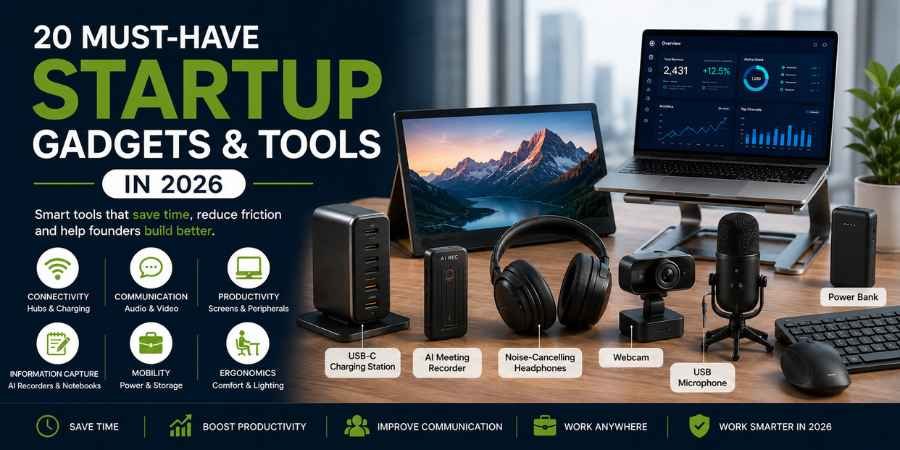
There is a strange temptation that comes with starting a company: every new gadget looks like a productivity investment.
A second monitor will make you faster. A better microphone will make you look more professional. An AI recorder will give you back hours. A smart desk will somehow turn you into the founder who wakes up at 5 a.m. and gets everything done before breakfast.
Sometimes that is true.
Sometimes it is just another purchase.
The best Startup Gadgets in 2026 are not necessarily the newest or most expensive. They are the ones that remove a recurring nuisance from your working day. A charging station gets rid of cable chaos. A portable monitor gives a travelling founder a second screen. An AI notetaker captures the meeting while you remain part of the conversation.
That is the standard we would use when deciding what deserves a place on a startup desk.
What are the best Startup Gadgets for founders in 2026?
The best Startup Gadgets for founders are tools that save time, reduce friction, improve communication or make it easier to work across locations.
For most founders, the priority order is fairly simple:
- Connectivity: USB-C hubs and charging stations
- Communication: webcams, microphones and headphones
- Productivity: portable monitors and multi-device peripherals
- Information capture: AI meeting recorders and smart notebooks
- Mobility: power banks, trackers and portable storage
- Ergonomics: laptop stands, lighting and comfortable peripherals
The AI hardware category deserves particular attention in 2026. Plaud says it has shipped more than 2 million AI notetaking devices and that its software business crossed a $100 million annualized revenue run rate.
That does not make every AI gadget a good investment. It does suggest that some AI hardware has moved beyond novelty.
Which 20 Startup Gadgets and Tools are worth buying?
| Startup gadget | Best for | Priority | Typical value |
| AI meeting recorder | Meetings | High | Saves documentation time |
| Portable monitor | Mobile work | High | Adds screen space |
| USB-C charging station | Multiple devices | High | Simplifies charging |
| Ergonomic mouse | Daily computer work | High | Comfort |
| Wireless keyboard | Heavy typing | High | Comfort/productivity |
| Noise-cancelling headphones | Focus/travel | High | Better calls and focus |
| Webcam | Video meetings | High | Professional communication |
| USB microphone | Calls/content | High | Better audio |
| Power bank | Travel | High | Keeps devices running |
| Smart notebook | Brainstorming | Medium | Digital handwriting |
| Smart tracker | Equipment | Medium | Helps locate valuables |
| Laptop stand | Ergonomics | High | Better screen positioning |
| USB-C hub | Connectivity | High | Adds missing ports |
| Monitor light bar | Desk lighting | Medium | Better workspace lighting |
| Smart speaker | Home office | Low | Hands-free tasks |
| External SSD | Large files | High | Storage and backup |
| Multi-device peripherals | Hybrid work | Medium | Easier device switching |
| Smart desk lamp | Home office | Medium | Adjustable lighting |
| Presentation clicker | Pitches | Medium | Easier presenting |
| Cable organiser | Desk management | Low | Reduces clutter |
1. AI Meeting Recorder
An AI meeting recorder is one of the more interesting pieces of startup hardware to emerge recently.
Features:
- Voice recording
- Automatic transcription
- Speaker identification
- AI-generated summaries
- Action-item extraction
- Searchable meeting records
- Some models support online and offline recording
Plaud is one of the most visible examples. TechCrunch reported in June 2026 that the company had shipped more than two million devices, while Pocket, another AI notetaking startup, has also attracted substantial funding and customer demand.
Why it matters: The useful part is not recording a meeting. It is being able to retrieve what was discussed without relying on someone’s memory.
Best for: Founders, sales teams, recruiters and customer-research teams.
Watch out for: Consent and privacy when recording other people.
2. Portable Monitor
A portable monitor is one of those gadgets you may dismiss until you actually have to work from a hotel room with a 13-inch laptop.
Features:
- USB-C connectivity
- Full HD or higher resolution
- 15- to 17-inch options
- Built-in stand or protective cover
- HDMI on selected models
- Lightweight construction
The KYY K3, for example, is a 15.6-inch Full HD portable monitor with USB-C and mini-HDMI connectivity; TechRadar recently highlighted it as a budget option at around $60. It is less suitable for colour-critical creative work, however.
Why it matters: A second screen reduces constant switching between documents, dashboards, calls and browsers.
Best for: Travelling founders, developers and consultants.
3. USB-C Charging Station
The startup desk has a predictable problem: laptop, phone, tablet, earbuds, watch and several cables competing for one socket.
Features:
- Multiple USB-C ports
- Fast charging
- Power Delivery
- Multiple-device support
- USB-A ports on some models
- Safety protections
Why it matters: This is not exciting technology. It is infrastructure. Once installed, you stop thinking about it.
Best for: Founders with several devices.
Buying tip: Look at total wattage, not just the number of ports.
4. Ergonomic Wireless Mouse
A mouse is easy to overlook precisely because it is used so often.
Features:
- Ergonomic design
- Wireless connectivity
- Adjustable sensitivity
- Programmable buttons
- Multi-device support
- Rechargeable battery
Why it matters: Repetitive work makes comfort a productivity issue.
Best for: Developers, designers, analysts and writers.
5. Wireless or Mechanical Keyboard
The right keyboard can make a surprisingly noticeable difference when writing code, proposals, reports or emails all day.
Features:
- Bluetooth or wireless connectivity
- Mechanical or low-profile switches
- Multi-device switching
- Rechargeable battery
- Programmable keys on some models
Why it matters: A founder may spend more time typing than expected. Comfort therefore matters more than aesthetics.
Best for: Developers, writers, marketers and founders.
6. Noise-Cancelling Headphones
The office might be a private room. It might also be a coworking space, airport lounge or kitchen table.
Features:
- Active noise cancellation
- Transparency mode
- Wireless connectivity
- Built-in microphone
- Multipoint connectivity
- Long battery life
Why it matters: You cannot always control the environment. You can control how much of it reaches your ears.
Best for: Travellers, remote workers and sales teams.
7. High-Quality Webcam
A founder may have a brilliant pitch and still look surprisingly unprepared on a bad video call.
Features:
- 1080p or 4K video
- Autofocus
- Automatic exposure
- Low-light correction
- Privacy shutter
- Built-in microphone
Why it matters: Resolution is only one part of a good webcam. Framing, exposure and autofocus can matter more during an actual business call.
Best for: Investor calls, recruitment, sales and webinars.
8. USB Microphone
If you are choosing between improving your camera and improving terrible audio, fix the audio first.
Features:
- USB plug-and-play
- Directional pickup
- Gain controls
- Headphone monitoring
- Mute button
- Noise-reduction features on some models
Why it matters: Poor audio forces everyone else to work harder to understand you.
Best for: Founders, podcasters, educators and sales professionals.
9. Portable Power Bank
A power bank looks boring until your phone reaches 2% five minutes before an investor call.
Features:
- 10,000mAh or larger capacities
- USB-C charging
- Fast charging
- Multiple outputs
- Battery indicator
Why it matters: Your phone may now carry authentication codes, customer messages, banking apps and your calendar. Keeping it powered is no longer merely convenient.
Best for: Travelling founders and mobile teams.
10. Smart Digital Notebook
Not everyone thinks best while staring at a keyboard.
Smart notebooks bridge handwriting and digital storage.
Features:
- Handwriting capture
- OCR
- Cloud synchronization
- Searchable notes
- Digital export
- Reusable pages on selected products
Why it matters: A sketch or handwritten idea can become a digital document without being manually typed from scratch.
Best for: Founders, designers and consultants.
11. Smart Tracker
Your laptop bag does not need another productivity feature. It needs to stop disappearing.
Features:
- Bluetooth tracking
- Smartphone alerts
- Location assistance
- Compact design
- Replaceable or rechargeable battery
Why it matters: A small tracker can help locate bags, keys and expensive equipment.
Best for: Travelling professionals.
12. Adjustable Laptop Stand
This is perhaps the least glamorous product here.
It is also one of the easiest to justify.
Features:
- Adjustable height
- Multiple angles
- Foldable designs
- Stable construction
- Ventilation
- Different size compatibility
Why it matters: Raising a laptop screen and pairing it with an external keyboard and mouse creates a much more sensible workstation for long sessions.
Best for: Remote workers and laptop-heavy founders.
13. USB-C Hub
Thin laptops are convenient until you need HDMI, Ethernet, an SD card and three USB devices simultaneously.
Features:
- USB-A ports
- HDMI
- USB-C
- SD/microSD
- Ethernet on selected models
- Power Delivery passthrough
Why it matters: A single hub can turn a laptop into a practical desktop setup.
Best for: Developers, designers, photographers and hybrid workers.
Buying tip: Verify display resolution and power-delivery specifications before buying.
14. Monitor Light Bar
A monitor light bar is a small workspace improvement that does not demand much desk space.
Features:
- Brightness adjustment
- Colour-temperature adjustment
- USB power
- Monitor mounting
- Compact footprint
Why it matters: It can provide focused workspace lighting without putting another lamp beside your monitor.
Best for: Home offices and compact desks.
15. Smart Speaker
This is not a must-have for everyone. That is exactly why it belongs lower on the list.
Features:
- Voice commands
- Timers
- Reminders
- Calendar integration
- Music
- Smart-home controls
Why it matters: Voice commands are useful for small tasks that do not justify stopping what you are doing.
Best for: Home offices.
16. External SSD
For video, design, development and data-heavy businesses, storage disappears quickly.
Features:
- High-speed data transfer
- USB-C
- Portable design
- Large capacities
- Shock resistance on selected models
Why it matters: It provides fast portable storage and an additional location for important files.
One important distinction: An external SSD is not a complete backup system. Critical startup data needs a proper backup strategy.
Best for: Developers, designers and content teams.
17. Multi-Device Keyboard and Mouse
One computer is increasingly not enough.
Features:
- Bluetooth
- Multi-device pairing
- Quick switching
- Wireless operation
- Rechargeable batteries
Why it matters: Switching from your work laptop to another machine should not involve rebuilding your entire desk.
Best for: Developers, founders and hybrid workers.
18. Smart Desk Lamp
“Smart” does not necessarily have to mean AI. Sometimes it simply means you can adjust the light without moving the lamp around.
Features:
- Brightness control
- Colour-temperature adjustment
- Scheduling
- App control
- Voice control on selected models
Why it matters: A workspace needs to work at 9 a.m. and 11 p.m., particularly when startup hours are rarely predictable.
Best for: Home offices and small workspaces.
19. Wireless Presentation Clicker
There are still moments when a founder has to stand in front of actual people.
Features:
- Wireless slide control
- Presentation timer
- Laser pointer on some models
- Compact design
- USB receiver or Bluetooth
Why it matters: During a pitch, your attention should be on the room, not on finding the arrow key on your laptop.
Best for: Founders, salespeople, consultants and speakers.
20. Desktop Cable Organiser
This may be the least exciting item on the list. It may also be the one that quietly improves your desk every day.
Features:
- Cable clips
- Cable sleeves
- Charging docks
- Velcro ties
- Under-desk mounting
Why it matters: Cable clutter creates tiny interruptions. You move one cable to reach another, search for the right charger and spend time fixing a problem that should not exist.
Best for: Every startup workspace.
How should you choose Startup Gadgets without wasting money?
Start with the problem, not the product.
Before buying, ask:
- What does this actually solve?
- How frequently will I use it?
- Will it save time?
- Does it work with my existing devices?
- Does it require a subscription?
- What happens if it stops working?
- Is the cheaper version good enough?
- Am I buying it because I need it or because it looks impressive?
That last question is particularly important with AI hardware.
The current AI gadget market is growing, but the technology still has to justify itself. A device that transcribes meetings and produces useful action items is solving a genuine problem. A conventional gadget with an AI-labelled companion app may not be doing anything meaningfully different.
One current business-gadget guide makes essentially the same distinction: useful AI hardware should remove a daily chore rather than simply carry an AI label.
What are the best Amazon startup gadgets to buy?
If you look for amazon startup gadgets, you will find everything from inexpensive cable organisers to premium monitors and AI recording devices.
That variety is useful, but it also makes impulse buying easy.
Before purchasing, check:
- Recent reviews
- Warranty
- Return policy
- Compatibility
- Power specifications
- Replacement availability
- Subscription requirements
Current business-travel recommendations, for example, continue to emphasize practical products such as power banks, portable monitors and rugged SSDs because they solve genuine mobility problems rather than merely adding features.
The cheapest product is not automatically the best value.
A $20 gadget that sits in a drawer has a higher effective cost than a $100 product you use every day.
What makes Smart gadgets genuinely useful for startups?
The word Smart has become so common in product marketing that it is worth being slightly suspicious of it.
Ask what the intelligence actually changes.
A camera that automatically frames a speaker is useful. A meeting recorder that identifies speakers and produces structured notes can be useful. A device that intelligently manages several charging requirements can be useful.
But adding an app to an ordinary desk lamp does not necessarily transform the lamp.
The best Smart gadgets remove a decision, repetitive task or interruption.
That is the standard I would use before spending company money.
Which Startup Gadgets should a new founder buy first?
If the budget is limited, start with the equipment you will touch every working day.
First priority:
- USB-C charging station
- Keyboard and mouse
- Laptop stand
- Webcam and microphone
- Noise-cancelling headphones
- Power bank
- USB-C hub
Then buy according to your business.
A content startup may need a microphone and lighting. A software company may benefit more from an external SSD and additional display. A travelling consultant may put a portable monitor, headphones and power bank at the top of the list.
There is no prize for having the most expensive desk.
What are the best Startup Gadgets for a small budget?
You do not need a futuristic office to build a serious company.
Start with the bottleneck. If meetings are consuming too much time, consider an AI meeting recorder. If you constantly switch between windows, consider a second monitor. If your laptop setup is uncomfortable, buy a stand. If your phone repeatedly dies while travelling, buy a power bank.
The principle is simple:
Upgrade the problem you experience repeatedly, not the gadget you happen to see trending.
Why are the best Startup Gadgets not always the most expensive?
Price and usefulness are not the same thing.
A $50 USB-C hub can solve a daily problem. A $300 smart device can sit unused because the workflow around it was never clearly defined.
This is where startups have an advantage over larger organisations: they can be selective.
You do not need to equip an imaginary future team. Buy for the work you are doing now, and upgrade when the business creates a genuine reason to do so.
Conclusion
The best Startup Gadgets in 2026 are not the ones that make your desk look futuristic.
They are the ones that quietly remove friction from your working day. Buy the second screen if you genuinely need another screen. Buy the AI recorder if meetings are generating too much information to capture manually. Buy the power bank if dead batteries keep interrupting your work.
Good technology should not demand your attention.
It should give some of it back.